[Elixir Nerves] Potentiometer with SPI-based Analog to Digital Converter
![[Elixir Nerves] Potentiometer with SPI-based Analog to Digital Converter](https://cdn.hashnode.com/res/hashnode/image/upload/v1612787131292/_8Y7cKDUZ.jpeg)
I will talk about how to read values from a potentiometer using an SPI-based Analog to Digital Converter (ADC). This is my study note. I am hoping it will help somebody.
Goals
- Read values from a potentiometer using an SPI-based Analog to Digital Converter (ADC).
- Print the readings to the log.
- Use the programming language Elixir and the IoT platform Nerves project to achieve the above.


Resources
I found the following resources helpful:
- Potentiometer sensor | Microsoft
- Circuits I2C library documentation
- tips on reading the MCP3002 datasheet
- how to use SPI from Elixir code
Hardware
Software
- Nerves project - IoT platform and infrastructure
- elixir-circuits/circuits_spi - Communicate over SPI from Elixir
Analog to Digital Converter (ADC)
There are different types of ADC out there. The higher the resolution, more accurate (10-bit vs 12-bit). The more channels, the more different inputs you can read (2-channel vs 8-channel).
I chose MCP3002 (10-bit resolution 2-channel) because I need neither high resolution or many channels.
Some options
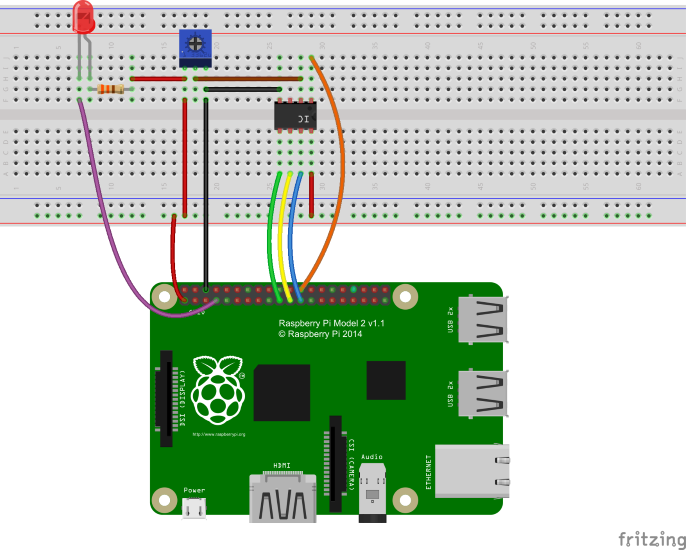
Wiring and connections
| MCP3002 | Raspberry Pi | Potentiometer |
| VDD/VREF | 3.3V | Vcc (either side) |
| CLK | SPI0 SCLK (Serial Clock) | - |
| Dout | SPI0 CIPO (Controllor In Peripheral Out) | - |
| Din | SPI0 COPI (Controllor Out Peripheral In) | - |
| CS/SHDN | SPI0 CS (Chip Select) | - |
| Vss | GND | GND (either side) |
| CH0 | - | wiper pin (middle) |


How to communicate with MCP3002 A/D Converter
It is explained in Figure 6-1 of the MCP3002 datasheet.

Connecting to the peripheral
# Raspberry Pis have two SPI buses.
iex> Circuits.SPI.bus_names
["spidev0.0", "spidev0.1"]

# Open the connection to one of them.
iex> {:ok, ref} = Circuits.SPI.open("spidev0.0")
{:ok, #Reference<0.3977234826.537788429.135085>}
Config bits
We specify which channel we want to read data from, configuring the config bits in Table 5-1 of the MCP3002 datasheet.

For using Ch0, the data we need to transmit is two bytes like the following, where x is ignored.
| Start | SGL/DIFF | ODD/SIGN | MSBF | ||||||||||||
| x | 1 | 1 | 0 | 1 | x | x | x | x | x | x | x | x | x | x | x |
| bit | value | description |
| Start | 1 | always 1 |
| SGL/DIFF | 1 | single-ended-mode Ch0 |
| ODD/SIGN | 0 | single-ended-mode Ch0 |
| MSBF | 1 | most-significant bit first |
Transmitted data
In Elixir, the above two bytes can be expressed as follows:
# First byte as an integer
iex> 0b01101000
104

iex> 0x68
104

# Second byte as an integer
iex> 0b00000000
0

iex> 0x00
0

# Together as a binary
iex> ch0 = <<0x68, 0x00>>
<<104, 0>>
Then we send it to the peripheral (MCP3002).
iex> {:ok, <<_::size(6), value::size(10)>>} = Circuits.SPI.transfer(ref, ch0)
{:ok, <<1, 197>>}
Received data
Since the resolution of MCP3002 is 10-bit (0..1023), we only read low 10 bits and ignore the rest.
# Min value of the potentiometer when the potetiometer is at one limit.
iex> with {:ok, <<_::6, value::10>>} <- Circuits.SPI.transfer(ref, ch0), do: value
1

# Max value of the potentiometer when the potetiometer is at the other limit.
iex> with {:ok, <<_::6, value::10>>} <- Circuits.SPI.transfer(ref, ch0), do: value
1023
Mapping value to a different range
Once we are able to read values from the potentiometer, we will most likely need to map the value to a different range, such as percentage.
defmodule MyModule do
  @doc """
  ## Examples
      iex> MyModule.map_range(65, {0, 1023}, {0, 100})
      6.35386119257087
  """
  def map_range(x, {in_min, in_max}, {out_min, out_max}) do
    (x - in_min) * (out_max - out_min) / (in_max - in_min) + out_min
  end
end
Demos
The logging demo
Once started, this demo will keep on logging the potentiometer value every second.
Only dependency is the elixir-circuits/circuits_spi library. As long as it is installed, you can just SSH into your target device and copy and paste the following snippet to play with the demo.
Or you could use my example Elixir/Nerves app as a playground.
defmodule SpiPotentiometer do
  @moduledoc """
  ## Examples

      RingLogger.attach
      (
        "spidev0.0"
        |> SpiPotentiometer.open_potentiometer()
        |> SpiPotentiometer.read_potentiometner_forever(1000)
      )
  """

  require Logger

  def open_potentiometer(spi_device) do
    {:ok, ref} = Circuits.SPI.open(spi_device)
    ref
  end

  def read_potentiometner_forever(spi_ref, interval \\ 1000) do
    {:ok, <<_::size(6), ten_bit_value::size(10)>>} = Circuits.SPI.transfer(spi_ref, <<0x68, 0x00>>)
    Logger.info("#{ten_bit_value} (#{map_range(ten_bit_value, {0, 1023}, {0, 100})}%)")
    Process.sleep(interval)
    read_potentiometner_forever(spi_ref, interval)
  end

  defp map_range(x, {in_min, in_max}, {out_min, out_max}) do
    (x - in_min) * (out_max - out_min) / (in_max - in_min) + out_min
  end
end
The servo demo
We could apply this technique to many other things like LEDs and servo motors. I used

Here is my source code.
Finally
This might be nothing special for electrical engineers but to me an Elixir/Nerves hobbist it was quite challenging. This post is actually for myself so that I can do the same thing quickly next time. That would be great if this post helps someone.